Exit Nodes
In Settings the section is named Exit Nodes. The same product capability is edge tracking nodes (Edge Tracking Nodes): separate servers closer to the audience. The admin SPA stays on the mother tracker only — the node has no SPA and no /admin. An EDGE campaign’s clicks are handled on the node; campaigns, offers, landings, and Track Paths arrive from the mother as releases (configuration snapshots).
Purpose. Install a node over SSH, bind a tracking domain (DNS to the node IP), switch the campaign to EDGE, assign a node+domain pair, build a flow, and confirm the assignment is ready before putting the URL into ads.
How this fits normal tracking
An Exit Node is a VM you install from Settings → Tracker → Exit Nodes. A Domain with Ingress target = Exit Node must resolve to that node’s IP, not the mother tracker’s CNAME/IP (otherwise Check DNS fails). DNS/SSL detail: Domains.
A Campaign uses mode EDGE (Exit Node): failure policy plus assignments (node → domain). Offers and Landings are created as usual and placed in Flows — there is no separate “edge copy”; the node gets a snapshot of the same entities. Ordinary edits sync automatically; if a snapshot stalls, Issue release on the node list force-pushes the current config.
When EDGE helps (and when it does not)
Use EDGE when you need tracking closer to the audience geo (your own IP/server in-region) or the tracking domain must point at the node IP. On EDGE you cannot rely on cloaking action curl or browser / t.js fingerprint; redirect fingerprint is computed on the node. Frequency cap and uniqueness are first applied per node, then reconciled on the mother after clicks are ingested — do not expect a global uniqueness view from one node alone.
If one tracker server is enough — keep DIRECT (main tracker) and Ingress = Main tracker. EDGE is optional for ordinary campaigns.
Prerequisites
Admin rights (or access to Settings, Domains, and Campaigns), a clean VM with a public IP and SSH (login/password only for the install job; the password is not stored in the DB or logs), a domain/subdomain you control, plus offer/source (and landing if needed) as in a normal launch — see Campaigns, Offers, Landing Pages.
How to open
- Sidebar → Settings → Tracker group → Exit Nodes (
/settings?tab=exit-nodes). - Domains: Domains (
/domains) → domain form → Ingress target. - Campaigns: Campaigns → campaign → Settings tab → Edge tracking block.
Install an Exit Node — step by step
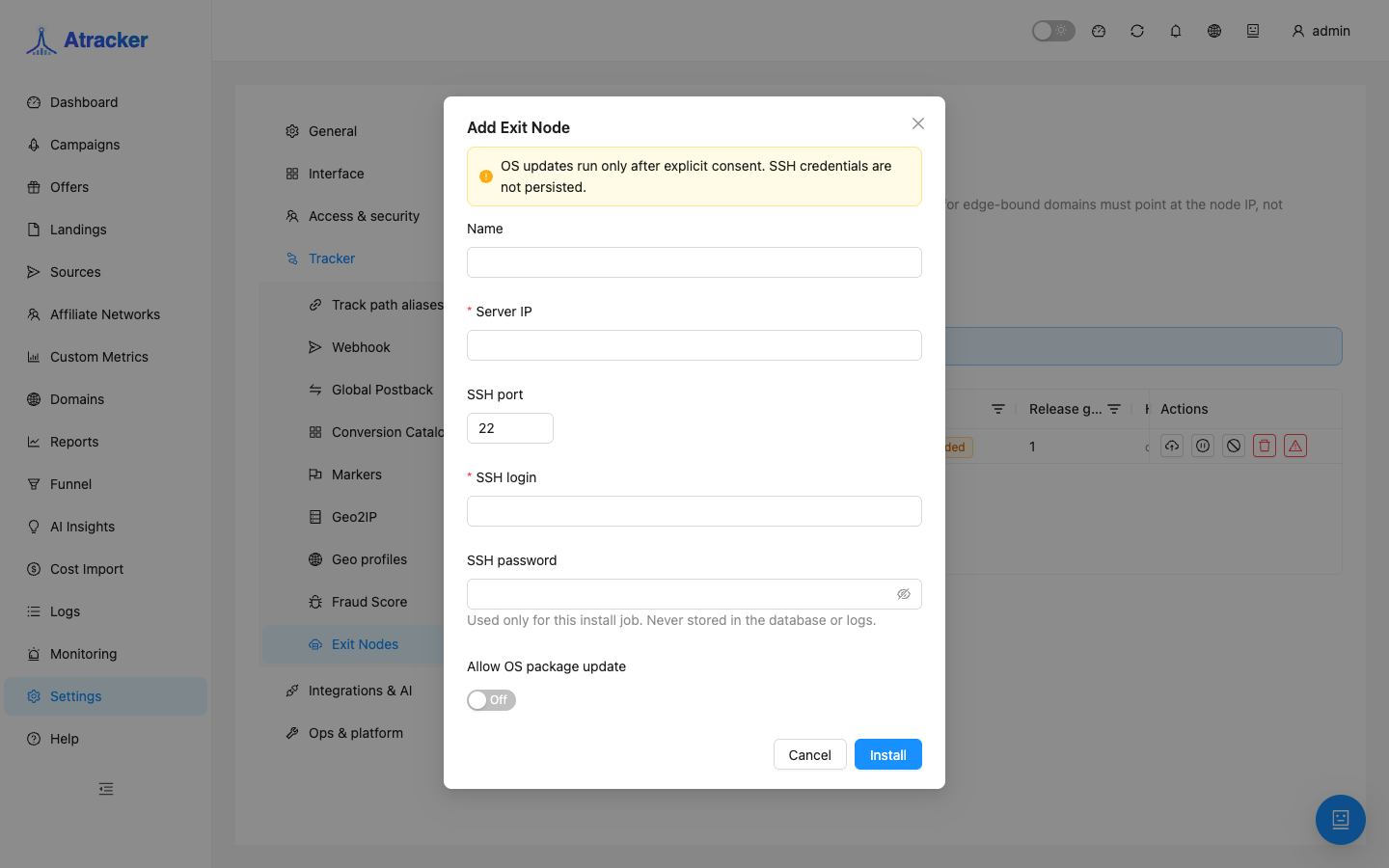
- Click Add Exit Node.
- Fill Name, Server IP, SSH port (usually 22), SSH login, and SSH password if needed.
- Enable Allow OS package update only if you consent to package updates during install. Without consent, the OS is left alone.
- Click Install and wait for the modal progress to finish (connecting → preflight → host_key_confirmation → server_updating → installing_dependencies → deploying_edge_runtime → bootstrapping_edge → registering_node → health_check → completed).
- If install stops on host key confirmation — verify the fingerprint against the server you expect, then confirm in the UI.
- On failure open the install log in the modal, fix SSH/network/firewall, and retry.
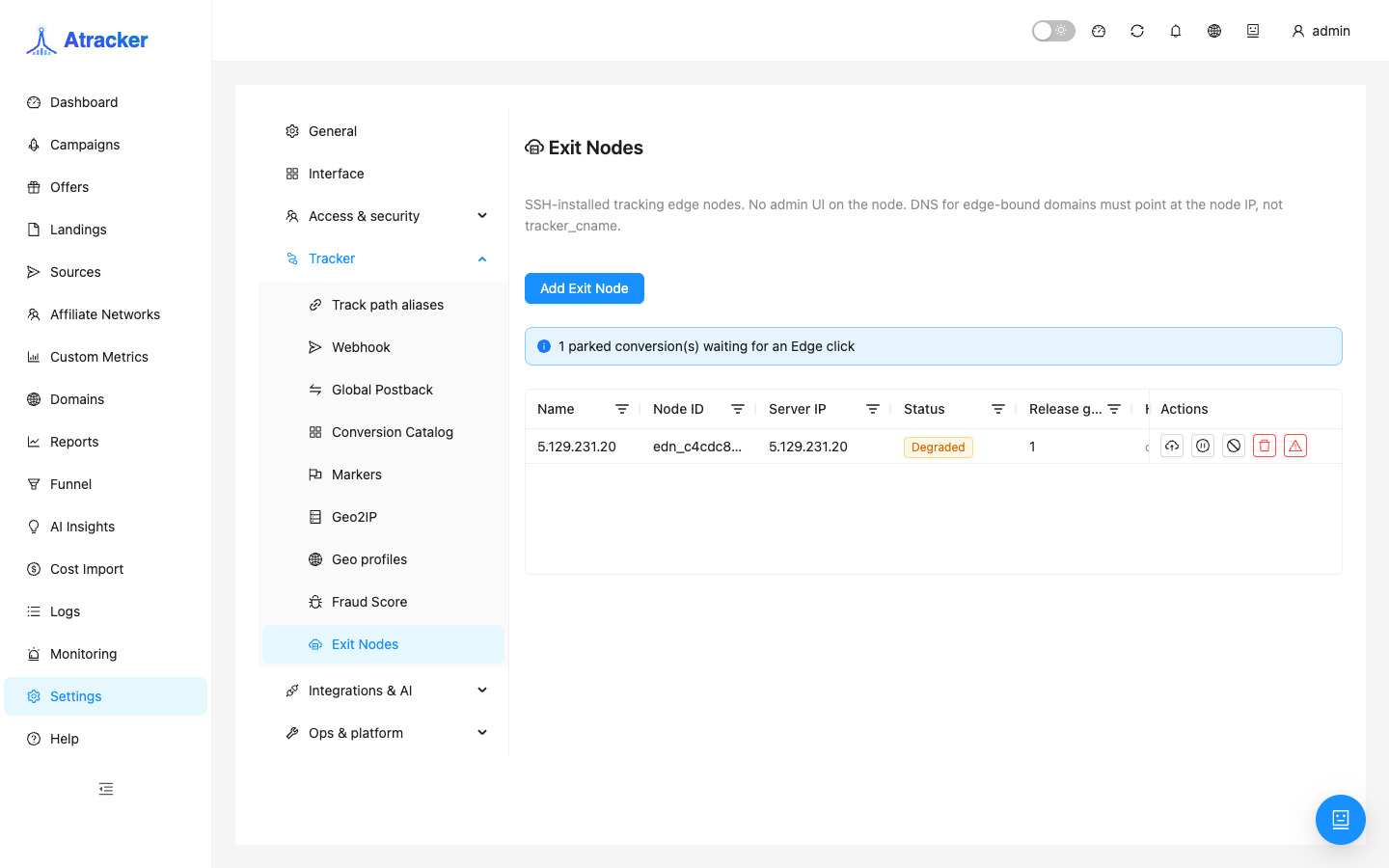
After success the node appears with a status and a release generation number. Watch heartbeat: connectivity, config freshness, event backlog. A parked conversions banner means a postback arrived before the Edge click — confirm ads hit the EDGE domain.
Node list: statuses and actions without button-hunting
Online is the healthy state for traffic. Provisioning / Confirming host means install is still running. Degraded means the node responds but something is wrong (often a stale snapshot or freshness issue) — do not send ads until you clear it. Draining stops new assignments while in-flight clicks finish. Offline / Failed — not ready for traffic on that node.
Issue release when you edited a campaign/offer/flow but readiness or heartbeat still shows a stale config. Drain is the planned take-out. Revoke invalidates credentials immediately: heartbeat and clicks from the node stop; the disk is not wiped. Wipe is a destructive VM clean-up that also removes the node row; the UI asks for its own confirmation. Do not revoke/wipe while DNS and campaign assignments still point at that node IP.
Domain: Ingress to Exit Node
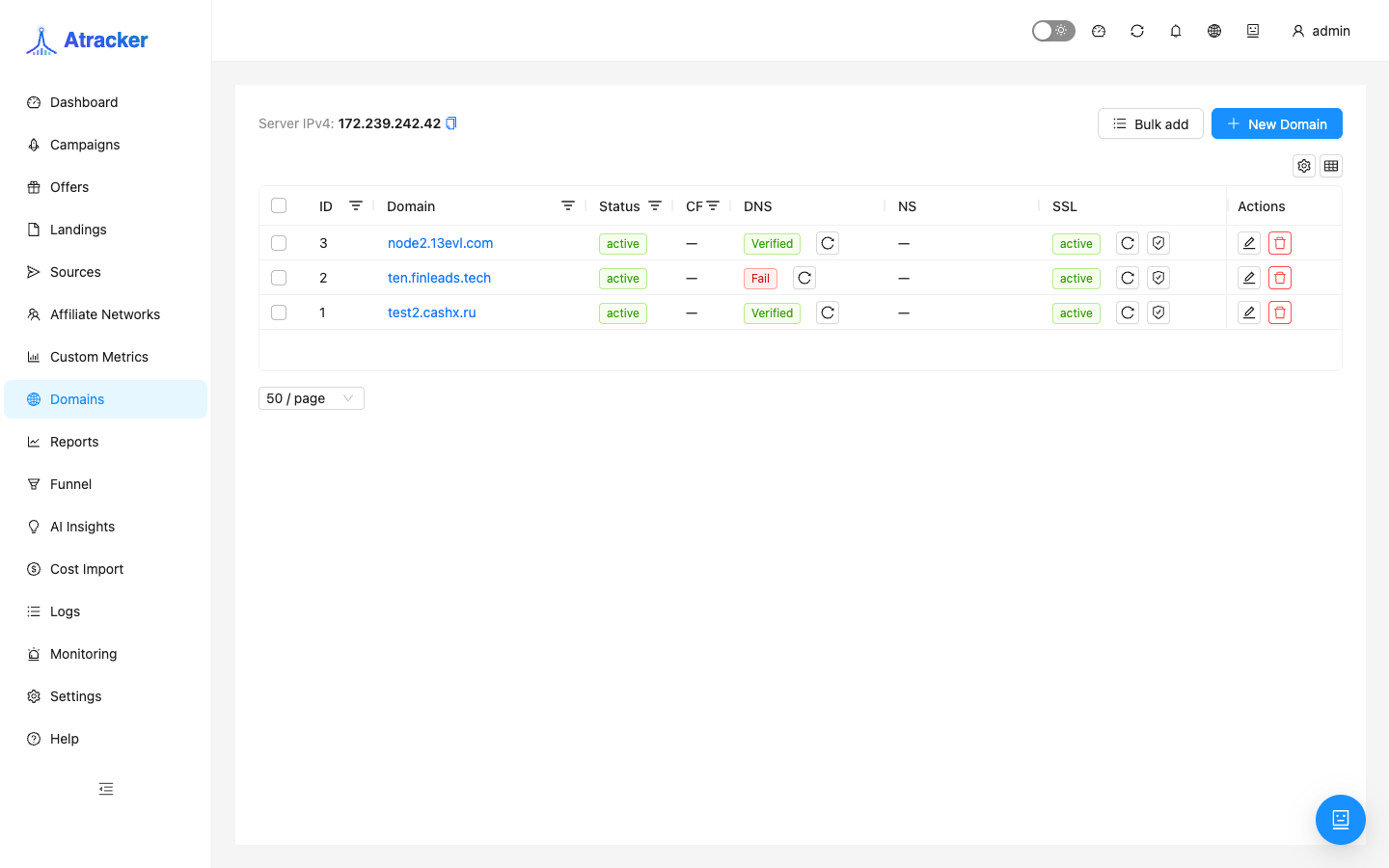
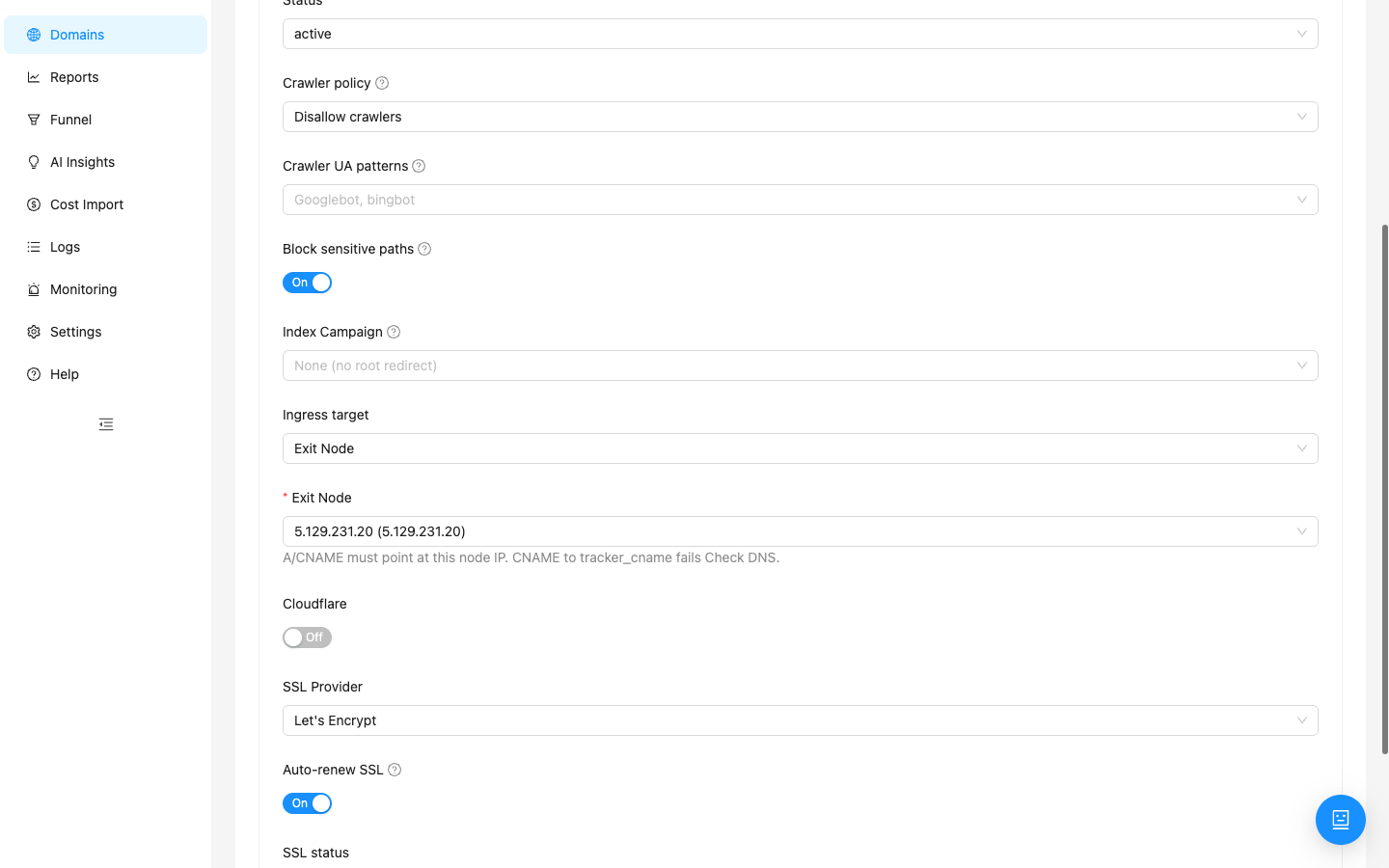
- Domains → New Domain / Edit — domain name, status active.
- Ingress target → Exit Node (not Main tracker).
- In Exit Node pick the node. At the registrar, A/CNAME must point at this node IP; CNAME to the mother’s system tracker CNAME fails Check DNS.
- SSL (Let's Encrypt / Cloudflare / Manual) as in the Domains article; wait for DNS Verified and SSL active.
- Save and open
https://your-edge-domain/with no browser warning.
One domain, one ingress: Main tracker or Exit Node. Switching ingress changes where DNS must point; update live ads deliberately.
Campaign: EDGE mode and assignments
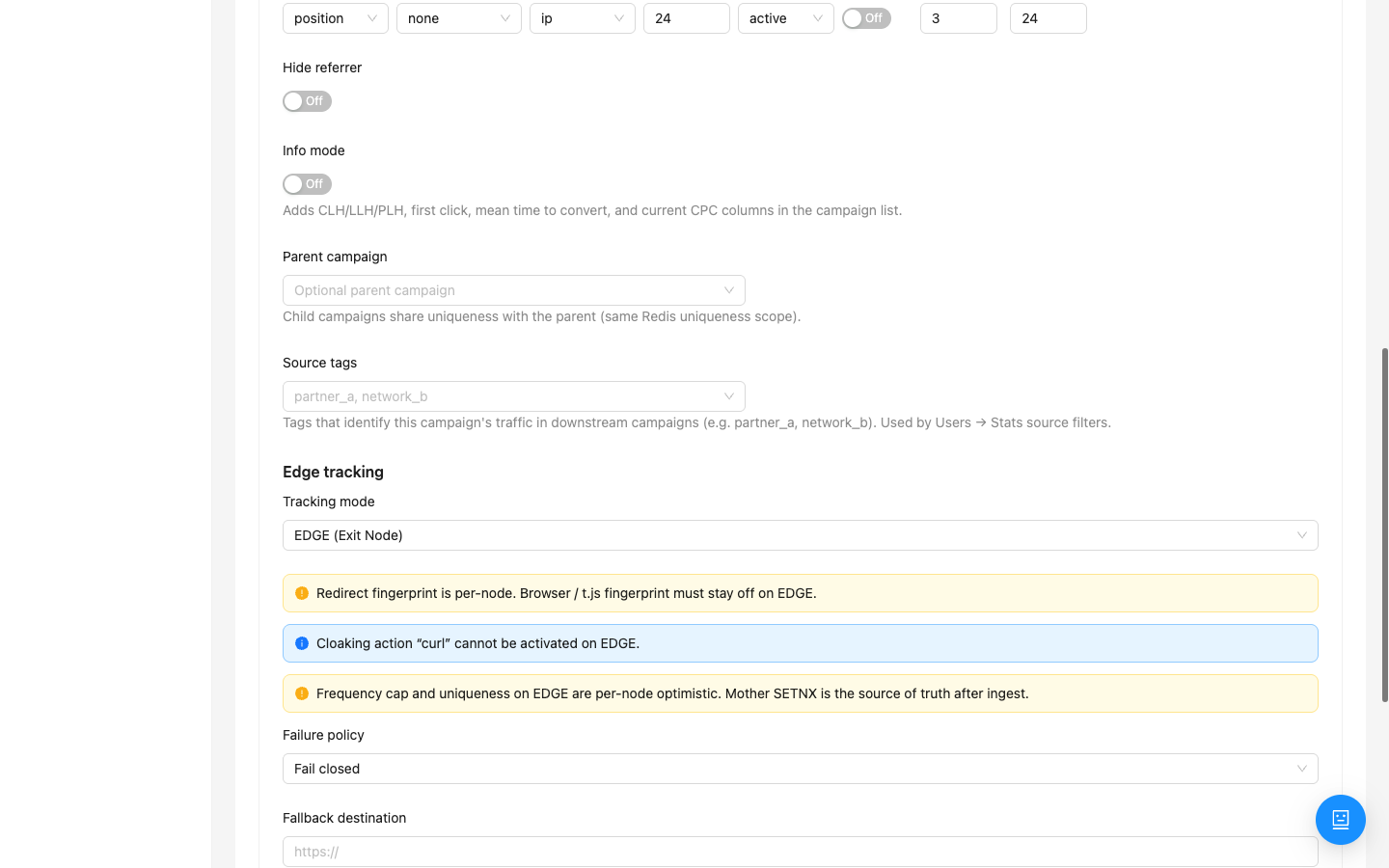
- Create or open a campaign and select a tracking domain already bound to an Exit Node (or bind it in parallel).
- In Edge tracking set Tracking mode = EDGE (Exit Node) and read the UI warnings: turn browser /
t.jsfingerprint off on EDGE; cloaking curl is not available on EDGE. - Choose Failure policy: Fail closed — on node problems traffic does not fall through to the main tracker; Fallback URL — your spare address in Fallback destination; Direct fallback (disclosed main URL) — put the main tracker URL in Fallback destination and check the disclosure (“I understand traffic may go to the main tracker URL”); without disclosure it will not redirect.
- Save the campaign (new ones — Save first), then assign Exit Node + Domain and click Save assignments. The mother’s system tracker CNAME is not a valid assignment domain.
- Wait for readiness: DNS+SSL+release ready. While Not ready (DNS, SSL, or artifacts missing), do not send ads. If assignments saved but the release did not arrive — Issue release on the node under Settings → Exit Nodes.
Offers, Landings, and Flows on EDGE
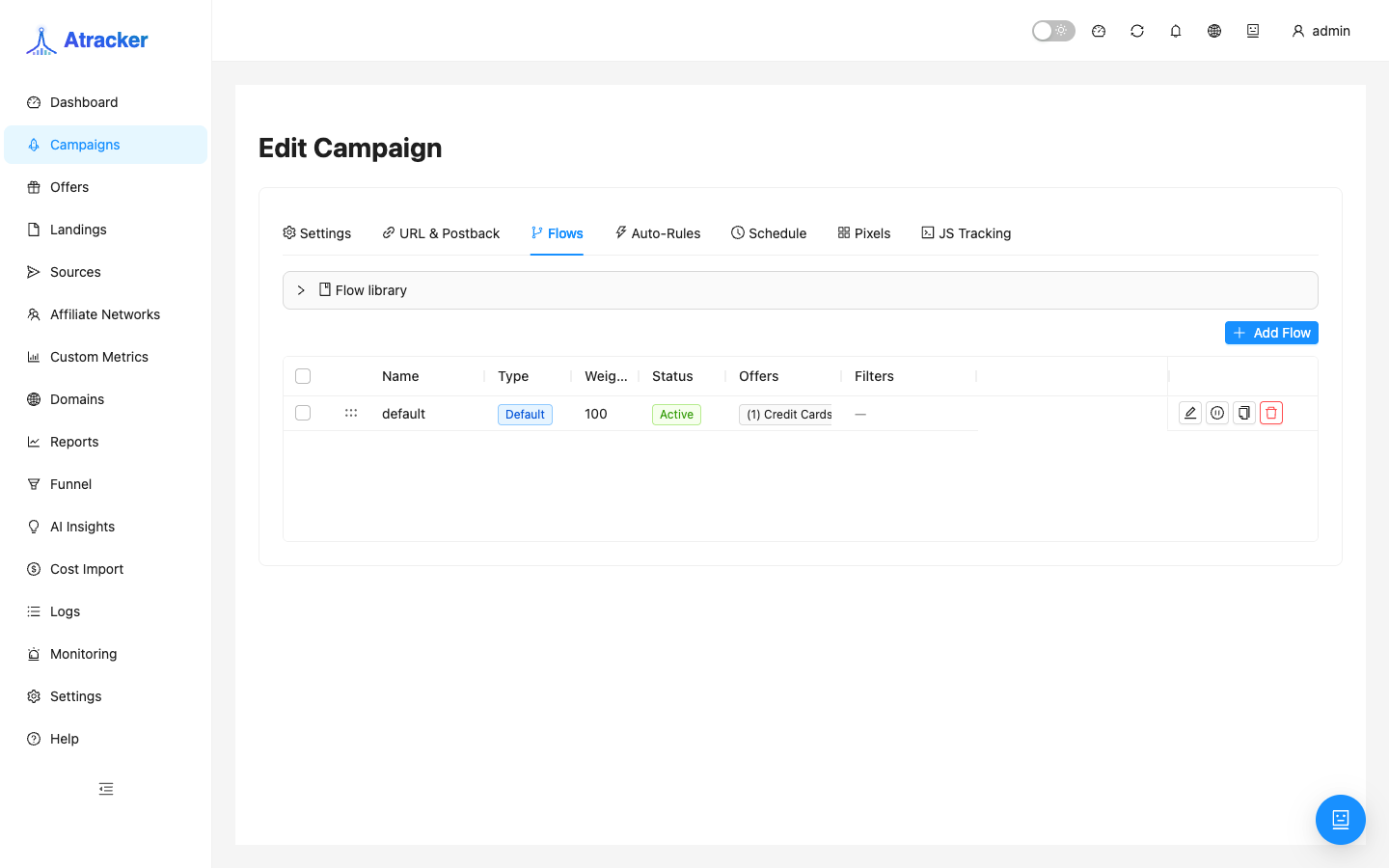
Same scheme as DIRECT: offer (and optional landing) → campaign flow. The difference is where the click is handled (the node) and that the snapshot must arrive first. Create the offer with {clickid} and network/postback per the Offers article; landing per Landing Pages; build the path on the campaign Flows tab. Copy the URL from URL & Postback (edge-domain host), open it in a private window, then check the click and a test conversion in Logs. After changing an offer URL or flow step, wait for a successful release and a fresh heartbeat — otherwise the node still serves the old path.
Typical scenarios
First EDGE launch. Node Online → Domain with Ingress = Exit Node, DNS to node IP, Verified + SSL → EDGE campaign with a ready assignment → flow with offer → test click → ads.
Offer change on a live EDGE campaign. Edit Offers / Flows → wait for automatic release (or Issue release) → check heartbeat / readiness → test click → only then mass-replace links in ad cabinets if the public URL changed.
Take a node out of rotation. Drain → let clicks finish → Revoke if needed. Move DNS and assignments off the node IP before destructive actions.
Fall back to DIRECT. Campaign mode → DIRECT, domain Ingress → Main tracker (and DNS to the mother), save, verify the URL. Update ads that still use the edge domain separately.
Checklist before sending ads
- Node is not Offline/Failed; heartbeat is not stuck on a long-stale config.
- Domain: Ingress = Exit Node, DNS Verified, SSL active, A/CNAME → node IP (not the mother tracker IP).
- Campaign: EDGE mode, assignment Ready.
- Flow has the intended offer/landing; a test click on the HTTPS edge domain runs the path.
- Logs show the click; a test conversion matches.
Common mistakes
- DNS points at the mother’s CNAME/IP while Ingress = Exit Node — Check DNS fails.
- EDGE mode without an assignment or with Not ready (DNS, SSL, or artifacts missing) — not ready for ads.
- Browser / t.js fingerprint left on, or relying on cloaking curl on EDGE — the UI warns; the setup will not behave like DIRECT.
- Expecting clicks on a mother URL while the campaign is EDGE — wrong host.
- Revoke/Wipe while assignments and DNS still target the node IP — tracking outage.
- Ignoring Degraded and a stale config in heartbeat — the node serves an old flow/offer.