Funnel
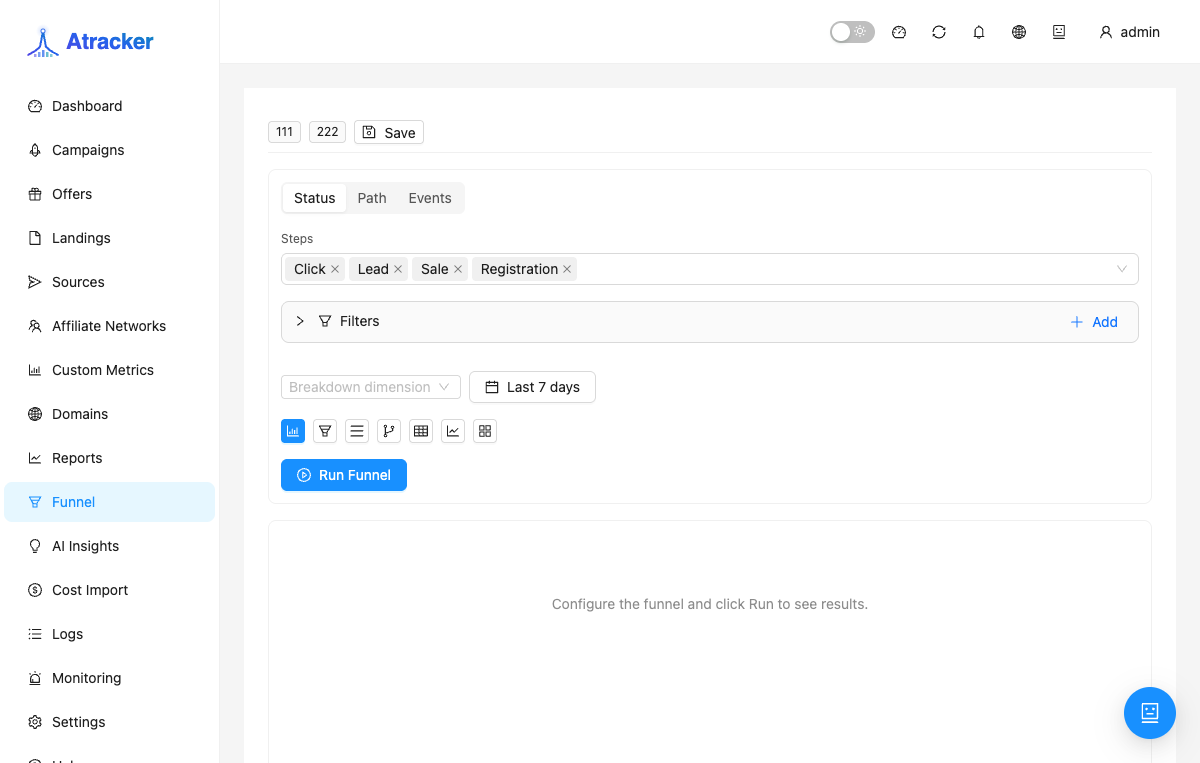
Funnel (/funnel) shows where traffic drops along the path from source to conversion. Unlike Reports (cut tables), Funnel answers where the funnel breaks and shows transition rates between steps.
Purpose
When campaign CR drops, Reports can show bad by country or sub_id but not whether the break is at landing, offer, or conversion. Funnel builds a step chain and counts how many reached each step. Modes: conversion statuses, path entities, or custom events.
Prerequisites
- Clicks exist for the period; later steps need landing/offer views and/or conversions.
- Permission for the
funnelspage. - For events mode — familiarity with funnel registry tables/fields.
How to open
- Sidebar → Funnel.
- Path:
/funnel. - Optional: shared link with
?token=...loads a shared preset config.
Funnel modes
status — steps by conversion funnel statuses (e.g. click → lead → sale → registration → deposit → rebill → rejected).
path — tracking entity stages in path order:
traffic_sourcecampaignflowlanding_pageofferconversion
You can select a subset of steps; order reflects the traffic path.
events — custom step conditions (table / field / operator / value) when status/path are not enough.
Choosing a mode
If the question is how many leads reached sale/deposit — use status. If it is which tracking entity drops (landing vs offer) — path. If you need a condition outside standard steps — events. Do not mix expectations: status does not draw a landing_page stage; path does not replace CPA status analysis.
Step-by-step workflow
- Set the period. Start with Last 7 days: too narrow is noisy, too wide slows Run on large accounts.
- Pick mode: status, path, or events.
- In status/path select steps. In path you may use a subset (e.g. campaign → landing_page → offer → conversion) while keeping path order. In events add step conditions one by one: table / field / operator / value.
- Add filters: campaign, offer, traffic source, flow, landing, country, device, sub_id, UTM, etc. Without a campaign filter, path on the whole account mixes unrelated bundles.
- Optionally set a breakdown (e.g. country or device) to compare segments on one funnel.
- Choose visualization: bars/funnel for drop overview; table for exact counts/%; trend for day dynamics; sankey/segmented for flow comparison. Weekly review usually needs funnel + table.
- Click Run. Read counts and transition %. The largest % drop between neighbors is the first hypothesis.
- Save a preset named like Path / campaign X / 7d.
Path fields in context
traffic_source — entry from the source. campaign — click already in the campaign. flow — in-campaign routing. landing_page — landing pass; sharp drops often mean prelander/A-B or a dead URL (check Monitoring). offer — offer transition; drops point to flow redirects/filters or offer downtime. conversion — recorded conversion; with healthy offers check postbacks, goals, and traffic quality (Logs, Fraud).
In status, steps like click → lead → sale → registration → deposit → rebill → rejected follow the catalog. A zero lead→sale with live leads in Logs usually means postback status/goal mapping, not a Funnel bug.
How to interpret
Find the largest relative drop between neighbors, then confirm absolute numbers in Reports for the same period and campaign. If early-step counts are already near zero, the problem is before the funnel (no clicks, filter, timezone). If early steps are live and conversion is empty, follow Logs → Clicks → Postbacks → Conversions. With breakdown, compare segments only at comparable volume.
Presets and sharing
Save working configs with a clear name. A shared ?token=... loads another preset for view/run. If the link fails, rebuild and save your own. A preset does not freeze numbers — each Run uses current data for the selected period.
Typical scenarios
- Single campaign, path. Filter campaign = X, path steps, viz = funnel. On a landing_page drop open Monitoring and a test click in Logs.
- Geo compare. Same path + country filter or country breakdown; then deepen bad geos in Reports.
- CPA status funnel. Mode status: click → lead → sale (deposit/rebill if needed); filter by affiliate network.
- After a flow/landing change. Period around the change + the same path preset; compare landing→offer and offer→conversion %.
- Events for a non-standard step. One condition per step, Run, cross-check counts with Logs.
Troubleshooting
- All steps zero: period, account timezone, campaign filter; clicks in Logs for the same dates.
- Early steps live, conversion = 0: Incoming postback, Conversion Catalog / Postback Mapping, test postback.
- Drop at offer while Monitoring is green: check flow filters/branches, not only HTTP 200.
- Events empty/odd: simplify the condition; compare with path/status on the same slice.
Common mistakes
- Running path with no campaign filter on a large account.
- Confusing status vs path: status does not show landing_page as an entity stage.
- Treating a zero step as a Funnel bug before checking Logs for the same period.
- In events, setting a condition without understanding the field.
- Optimizing CR from Funnel while Monitoring shows the offer down.